An OS that represents the user would be able to grant the permission to scan only an arbitrary subset of the filesystem, with the application being none the wiser. We need to start seeing the lack of such functionality as a security vulnerability.
I agree. I don't understand why I can't say "okay, have fun with directory /nakedmolerats" and see what they do with it.
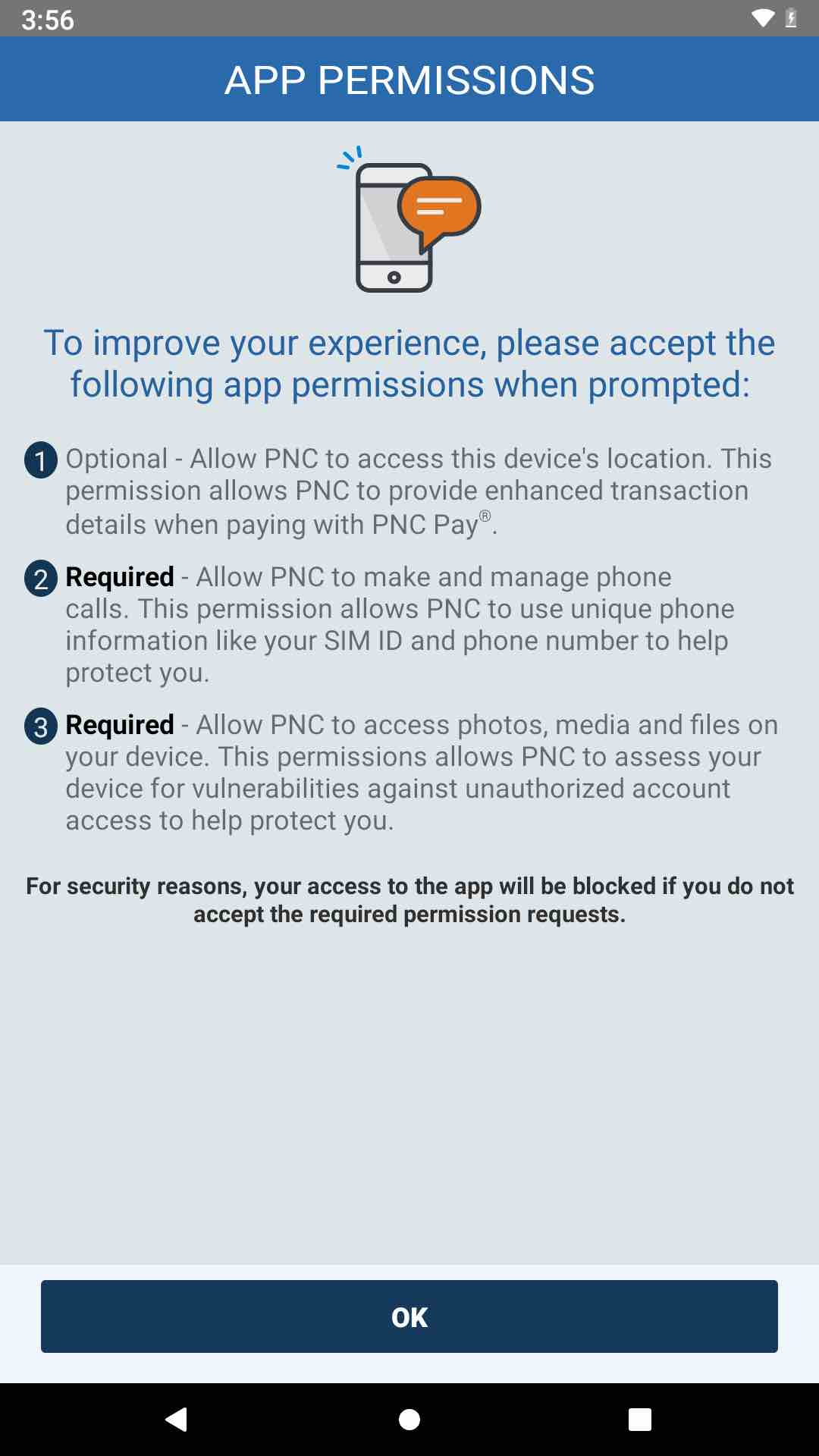
The fact an app can essentially coerce you into accepting permissions "for your safety" is something that should be against Plays TOS and met with a swift banhammer.
It should also highlight how little control we have over these black boxes, when you grant permission, even for 5 minutes, you have no idea what directories it has accessed, if it's scanning for materials or hashes, sending data to a server etc. People moaned about Apple yet here the same thing could happen just by pressing "accept", the fact it's a banking app means you're more likely to accept. No idea how this is allowed to be honest.
This could also be a big problem if you have sensitive material on device and just allow any app to access files.
I just went through the Simple -> BBVA -> PNC transition. Yesterday when I installed the PNC app on my Pixel, I got the warning that I would need to allow storage access. But then the storage access prompt never came up. I just checked, the app doesn't have storage access but it works fine. Either they ended up not using the storage (maybe using a legitimate attestation API), or the latest (for one week) version of Android has a different, isolated storage API that doesn't need permission.
but it is intended for dedicated file manager apps and requires an application to be manually reviewed by Google. Which hopefully means, that banks and other shady organizations won't qualify.
I went through the first 2 steps of that and pulled the ripcord once BBVA screwed up my accounts and closed one of them with no notice. I'm now using One Finance [0] and I'm very happy with them so far. Very Simple-like. Personally I don't use the "Pockets" much (but it is nice to be able to get a new Acc/Routing number and/or debit card on the fly) since I use YNAB to manage all my finances but it's a cool feature.
To be honest, having read the text in the image and mindslights post I am reminded that for a "permission" system on Android (and iOS) it's basically an "all or nothing" approach.
If I agree to location, I should be allowed to select where abouts I want that to be
If I agree to files, I want to select a directory and what data it can access about those files (for example, it can't access exif from my photos, nor the file created date)
If it wants my phone log, is it okay it can take every record ever made? Even ones from years ago?
Apps can take your entire contacts list once given permission, just a simple for each loop and upload to a server. I imagine once you've granted access, even if only for 30 seconds that's enough time to parse and upload the information elsewhere.
It's incredibly worrying how giving permission you're not aware of just how much data you're essentially allowing access to, if apps were required to select more precisely what they want, for how long and why and how it will be used, more people would hopefully be encouraged to think again.
Now with cookie popups across the web everyone just clicks "accept! Take all my data please!!". And often time that data you share is about others, so even if you are careful with whom you share information with, all it takes is one person to agree to share all their records on device and your carefully controlled fortress comes crumbling down...
I will say that’s one thing I appreciate about iOS’s more recent permission tweaks. When you give access to photos, you can pick all, or pick which specific pictures the app gets access to, or no access to any - only write access.
For location, you can pick one time only, or access while you’re using the app (which some apps I think from there try to access it in the background, but iOS will notify you and ask you if you’re sure that’s okay every couple days or so I think. I’ve also been on dev betas and only really remember it complaining about the Weather widget using this all the time).
Definitely seems better than the all or nothing approach I remember from Android. But also I haven’t used android since android 9 was hot, so maybe things have evened out since.
It could be because it was a corporate card, but my experience with the pnc credit card was abysmal at every step of the way, from activation, to them not catching the fraud, to then the annoying process of documenting it and them taking forever to investigate. I am not surprised that their other systems are poorly thought out.

mindslight|4 years ago
aboringusername|4 years ago
The fact an app can essentially coerce you into accepting permissions "for your safety" is something that should be against Plays TOS and met with a swift banhammer.
It should also highlight how little control we have over these black boxes, when you grant permission, even for 5 minutes, you have no idea what directories it has accessed, if it's scanning for materials or hashes, sending data to a server etc. People moaned about Apple yet here the same thing could happen just by pressing "accept", the fact it's a banking app means you're more likely to accept. No idea how this is allowed to be honest.
This could also be a big problem if you have sensitive material on device and just allow any app to access files.
atatatat|4 years ago
sfshaw|4 years ago
yc12340|4 years ago
https://developer.android.com/about/versions/11/privacy/stor...
Asking for access to root directory is not allowed. Asking for access to "Downloads" or app-specific external directories is not allowed either.
There is an escape hatch:
https://www.xda-developers.com/google-file-manager-devs-subm...
but it is intended for dedicated file manager apps and requires an application to be manually reviewed by Google. Which hopefully means, that banks and other shady organizations won't qualify.
joshstrange|4 years ago
[0] https://www.onefinance.com/
aboringusername|4 years ago
If I agree to location, I should be allowed to select where abouts I want that to be
If I agree to files, I want to select a directory and what data it can access about those files (for example, it can't access exif from my photos, nor the file created date)
If it wants my phone log, is it okay it can take every record ever made? Even ones from years ago?
Apps can take your entire contacts list once given permission, just a simple for each loop and upload to a server. I imagine once you've granted access, even if only for 30 seconds that's enough time to parse and upload the information elsewhere.
It's incredibly worrying how giving permission you're not aware of just how much data you're essentially allowing access to, if apps were required to select more precisely what they want, for how long and why and how it will be used, more people would hopefully be encouraged to think again.
Now with cookie popups across the web everyone just clicks "accept! Take all my data please!!". And often time that data you share is about others, so even if you are careful with whom you share information with, all it takes is one person to agree to share all their records on device and your carefully controlled fortress comes crumbling down...
Sigh.
cschmittiey|4 years ago
For location, you can pick one time only, or access while you’re using the app (which some apps I think from there try to access it in the background, but iOS will notify you and ask you if you’re sure that’s okay every couple days or so I think. I’ve also been on dev betas and only really remember it complaining about the Weather widget using this all the time).
Definitely seems better than the all or nothing approach I remember from Android. But also I haven’t used android since android 9 was hot, so maybe things have evened out since.
mint2|4 years ago
floatingatoll|4 years ago
grateful|4 years ago
nottaylorswift|4 years ago