
(no title)
bnieuwen | 3 years ago
Furthermore note there is a difference between SoC package power and power pulled from the wall. That depends on the rest of the device, but 5-10W isn't unreasonable. (So e.g. at 22W package power, pulling ~32W from battery is pretty common). Looking at the detailed graph in the NUC review, that difference is particularly large though, the package only pulls <20W in steady state and maybe 30W at boost[0], but this device somehow seems to have significant power draw coming from somewhere else, this is pretty atypical wrt laptops & battery draw at least.
I'm not sure what performance per clock advantage going from desktop to mobile you're referring to? The mobile chips are slower due to the lower max boost and power limits, but due to non-linear power scaling it tends to be not that* much worse than the desktop parts.
As an aside I find the Anandtech Zen3 review[1] a pretty good resource when I want to have a clue about reasonable clock/power expectations on zen3 (though it is only a single workload)
(Also not sure where the 52W claim comes from, my searching on the linked page seems to yield no results?)
*: With the notable exception that pre-6000 series AMD had some horrible delay clocking up the cores when on battery, hitting short tests like geekbench. That said even on AC the chips should be adhering to configured power limits.
[0] https://images.anandtech.com/doci/16236/wm-aida_power.png [1] https://www.anandtech.com/show/16214/amd-zen-3-ryzen-deep-di...
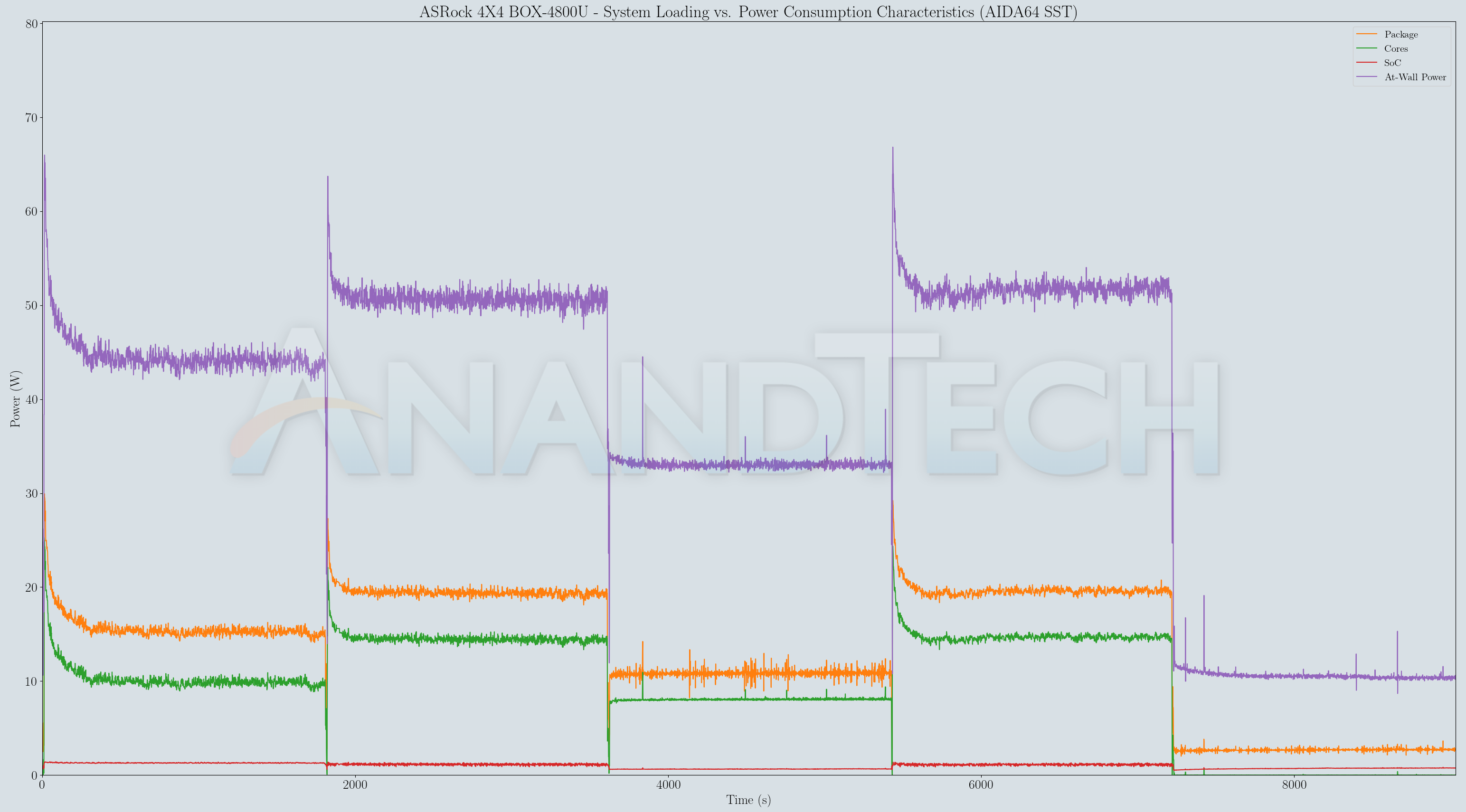
hajile|3 years ago
What is missing in that story? Is it more likely that a mystery chip is dissipating 40w into that tiny chassis or that something isn't reported correctly?
Perhaps the answer is something to do with the chipset using a massive 40w of power. That isn't likely as even the actively-cooled desktop chipsets don't use that much power. Even if that's true, not only does the dissipation issue still go unanswered, but the SoC it is being compared to also moves everything on-chip, so adding in that power consumption is necessary for an equal comparison.
There's no suitable answer to this problem other than the reported numbers being wrong.
> I'm not sure what performance per clock advantage going from desktop to mobile you're referring to?
M2 peak performance at 3.5GHz is equal or better than desktop Zen 3 chips running at 5+GHz.
The second link you post shows the 5950X (with the best binned chiplets with the lowest power/core numbers) requiring 7.5w per core at 3.7GHz. That means you could barely get HALF your cores running at 3.7GHz at 30w. All of them at that speed (1GHz less than turbo) would take around 60w of power (by the way, 6850H has a 45w TDP and claims base clocks of 3.7GHz, so something doesn't quite match up there either).
Even hitting 8 cores at 2.7GHz seems to be a stretch within that 28w TDP limit. EPYC with it's top-binned chiplets requires around 4-4.5w per core to hit 2.45GHz base clocks.
Adding between 700MHz and 1GHz to the clockspeed plus a well-known 60% faster per clock design plus cutting cache in half for Zen 3 mobile (which increases total power usage too) makes the benchmark results super fishy as they would require massive increases in IPC (or massive crippling of the M2 chip). This is of course not true, which indicates something is wrong somewhere.