
Launch HN: Mosaic (YC W25) – Agentic Video Editing
We were engineers at Tesla and one day had a fun idea to make a YouTube video of Cybertrucks in Palo Alto. We recorded hours of cars driving by, but got stuck on how to scrub through all this raw footage to edit it down to just the Cybertrucks.
We got frustrated trying to accomplish simple tasks in video editors like DaVinci Resolve and Adobe Premiere Pro. Features are hidden behind menus, buttons, and icons, and we often found ourselves Googling or asking ChatGPT how to do certain edits.
We thought that surely now, with multimodal AI, we could accelerate this process. Better yet, an AI video editor could automatically apply edits based off what it sees and hears in your video. The idea quickly snowballed and we began our side quest to build “Cursor for Video Editing”.
We put together a prototype and to our amazement, it was able to analyze and add text overlays based on what it saw or heard in the video. We could now automate our Cybertruck counting with a single chat prompt. That prototype is shown here: https://www.youtube.com/watch?v=GXr7q7Dl9X0.
After that, we spent a chunk of time building our own timeline-based video editor and making our multimodal copilot powerful and stateful. In natural language, we could now ask chat to help with AI asset generation, enhancements, searching through assets, and automatically applying edits like dynamic text overlays. That version is shown here: https://youtu.be/X4ki-QEwN40.
After talking to users though, we realized that the chat UX has limitations for video: (1) the longer the video, the more time it takes to process. Users have to wait too long between chat responses. (2) Users have set workflows that they use across video projects. Especially for people who have to produce a lot of content, the chat interface is a bottleneck rather than an accelerant.
That took us back to first principles to rethink what a “non-linear editor” really means. The result: a node-based canvas which enables you to create and run your own multimodal video editing agents. https://screen.studio/share/SP7DItVD.
Each tile in the canvas represents a video editing operation and is configurable, so you still have creative control. You can also branch and run edits in parallel, creating multiple variants from the same raw footage to A/B test different prompts, models, and workflows. In the canvas, you can see inline how your content evolves as the agent goes through each step.
The idea is that canvas will run your video editing on autopilot, and get you 80-90% of the way there. Then you can adjust and modify it in an inline timeline editor. We support exporting your timeline state out to traditional editing tools like DaVinci Resolve, Adobe Premiere Pro, and Final Cut Pro.
We’ve also used multimodal AI to build in visual understanding and intelligence. This gives our system a deep understanding of video concepts, emotions, actions, spoken word, light levels, shot types.
We’re doing a ton of additional processing in our pipeline, such as saliency analysis, audio analysis, and determining objects of significance—all to help guide the best edit. These are things that we as human editors internalize so deeply we may not think twice about it, but reverse-engineering the process to build it into the AI agent has been an interesting challenge.
Some of our analysis findings: Optimal Safe Rectangles: https://assets.frameapp.ai/mosaicresearchimage1.png Video Analysis: https://assets.frameapp.ai/mosaicresearchimage2.png Saliency Analysis: https://assets.frameapp.ai/mosaicresearchimage3.png Mean Movement Analysis: https://assets.frameapp.ai/mosaicresearchimage4.png
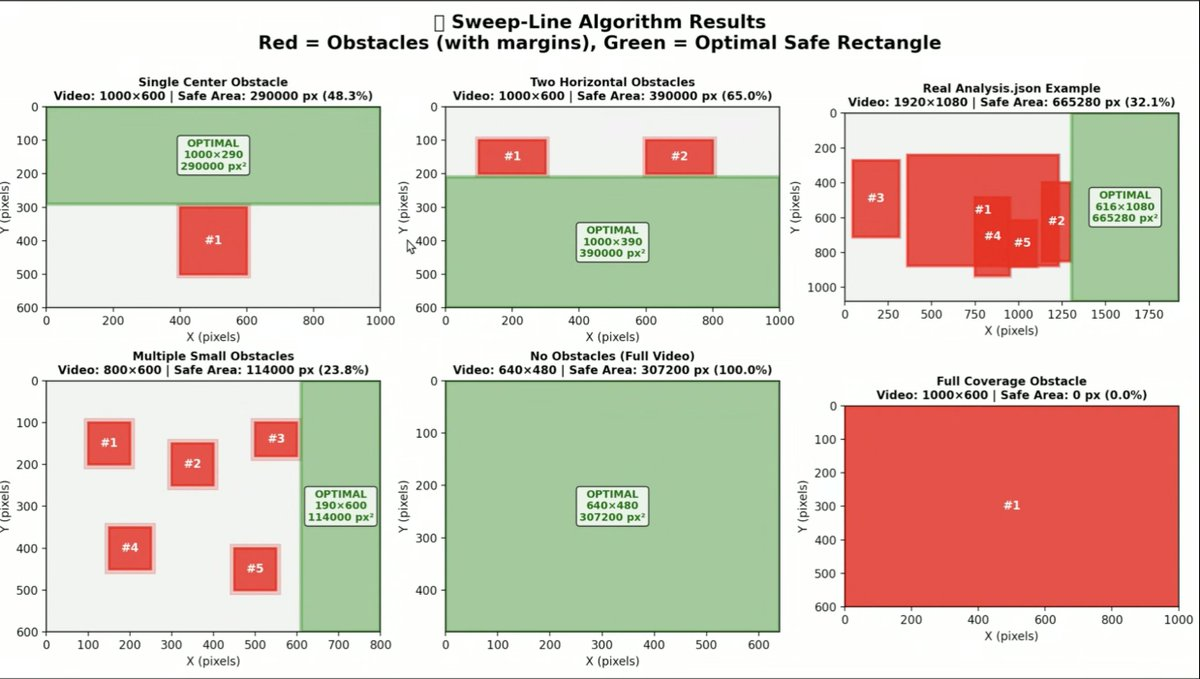
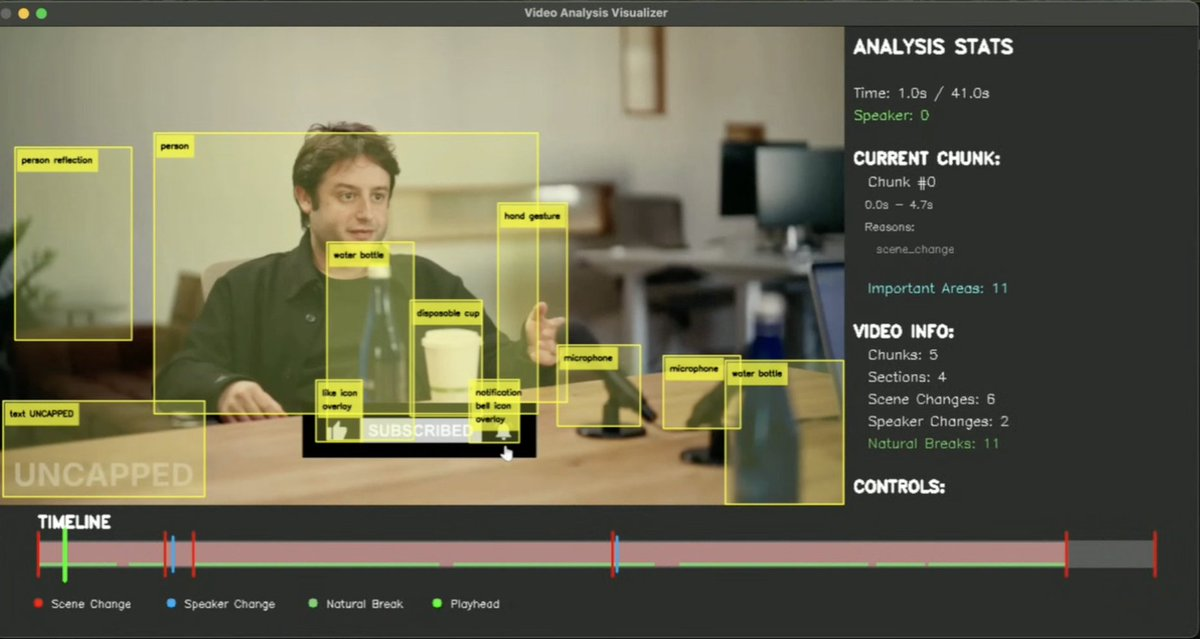
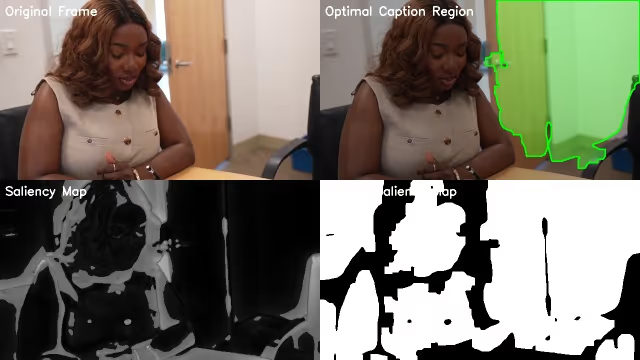

Use cases for editing include: - Removing bad takes or creating script-based cuts from videos / talking-heads - Repurposing longer-form videos into clips, shorts, and reels (e.g. podcasts, webinars, interviews) - Creating sizzle reels or montages from one or many input videos - Creating assembly edits and rough cuts from one or many input videos - Optimizing content for various social media platforms (reframing, captions, etc.) - Dubbing content with voice cloning and lip syncing.
We also support use cases for generating content such as motion graphic animations, cinematic captions, AI UGC content, adding contextual AI-generated B-Rolls to existing content, or modifying existing video footage (changing lighting, applying VFX).
Currently, our canvas can be used to build repeatable agentic workflows, but we’re working on a fully autonomous agent which will be able to do things like: style transfer using existing video content, define its own editing sequence / workflow without needing a canvas, do research and pull assets from web references, and so on.
You can try it today at https://edit.mosaic.so. You can sign up for free and get started playing with the interface by uploading videos, making workflows on the canvas, and editing them in the timeline editor. We do paywall node runs to help cover model costs. Our API docs are at https://docs.mosaic.so. We’d love to hear your feedback!
[+] [-] primitivesuave|4 months ago|reply
These seem like problems that LLMs are especially well-suited for. I might have spent a fraction of the time if there was some system that could "index" my content library, and intelligently pull relevant clips into a cohesive storyline.
I also spent an ungodly amount of time on animations - it felt like "1 hour of work for 1 minute of animation". I would gladly pay for a tool which reduces the time investment required to be a citizen documentarian.
[+] [-] adishj|4 months ago|reply
we don't yet support that volume of footage (1TB), however if you'd like to try this at a smaller scale, you can already do this today with the Rough Cut tile — simply prompt it for the moments that you're interested in (it can take visual cues, auditory cues, timestamp cues, script cues) and it will create an initial rough cut or assembly edit for you.
I'd also recommend checking out the new Motion Graphics tile we added for animations. You can also single-point generate motion graphics using the utility on the bottom right of the timeline. Let me know if you have any questions on that.
[+] [-] breadislove|4 months ago|reply
we have couple investigative journalists and lawyers using us for a similar usecase.
[+] [-] robotswantdata|4 months ago|reply
[+] [-] cjbarber|4 months ago|reply
This is a long winded way of saying that I think creators need what you're making! People who have hours of awesome footage but have to spend dozens of hours cutting it down need this. Then also people who have awesome footage but aren't good at editing or hiring an editor, same thing. I'd love to see someone solve this so that 90th percentile editing is available to all, and then it can be more about who has the interesting content, rather than who has the interesting content and editing skills.
[+] [-] adishj|4 months ago|reply
soon, we also plan to incorporate style transfer, so you could even give it a video from the channel you enjoy watching + your raw footage, and have the agent edit your footage in the same style of the reference video.
[+] [-] moinism|4 months ago|reply
I'm building something exactly similar and couldn't believe my eyes when I saw the HN post. What i'm building (chatoctopus.com) is more like a chat-first agent for video editing, only at a prototype stage. But what you guys have achieved is insane. Wishing you lots of success.
to healthy competition!
[+] [-] ack210|4 months ago|reply
[+] [-] adishj|4 months ago|reply
[+] [-] adishj|4 months ago|reply
[+] [-] djeastm|4 months ago|reply
[+] [-] ansc|4 months ago|reply
[+] [-] Forgeties79|4 months ago|reply
Hidden behind a UI? Most of the major tools like blade, trim, etc. are right there on the toolbars.
> We recorded hours of cars driving by, but got stuck on how to scrub through all this raw footage to edit it down to just the Cybertrucks.
Scrubbing is the easiest part. Mouse over the clip, it starts scrubbing!
I’m being a bit tongue in cheek and I totally agree there is a learning curve to NLE’s but those complaints were also a bit striking to me.
[+] [-] adishj|4 months ago|reply
Scrubbing is easy enough when you have short footage, but imagine scrubbing through the footage we had of 5 hours of cars driving by, or maybe a bunch of assets. This quickly becomes very tedious.
[+] [-] andrewmlevy|4 months ago|reply
[+] [-] kul|4 months ago|reply
[+] [-] adishj|4 months ago|reply
[+] [-] sails|4 months ago|reply
I will be checking this out!
[+] [-] adishj|4 months ago|reply
they're very powerful, when you put them together, it almost feels like Cursor for Video Editing
[+] [-] hypnagogicjerk|4 months ago|reply
[+] [-] shraey_92|4 months ago|reply
Also, do you have an API available to trigger workflows programmatically?
[+] [-] homeonthemtn|4 months ago|reply
[+] [-] dang|4 months ago|reply
We tell founders to avoid that (scroll down to the bold part of https://news.ycombinator.com/yli.html for how we try to scare YC founders into not doing it!) - but to be fair, (1) this is not always easy to control, and (2) people posting such comments think they're helping and don't have enough experience of HN to realize that it has a counter-effect.
I'm going to move the overly sus ones to a collapsed stub now. (https://news.ycombinator.com/item?id=45988584)
[+] [-] adishj|4 months ago|reply
[+] [-] rsancheti|4 months ago|reply
[+] [-] adishj|4 months ago|reply
for example, if you have a workflow setup to create 5 clips from a podcast and add b-rolls and captions and reframe to a few different aspect ratios, any time you invoke this workflow (regardless of which podcast episode you're providing as input), you'll get 5 clips back that have b-rolls, captions, and are reframed to a few different aspect ratios
however, which clips are selected, what b-rolls are generated, where they're placed — this is all non-deterministic
you can guide the agent via prompting the tiles individually, but that's still just an input into a non-deterministic machine
[+] [-] jaccola|4 months ago|reply
Would have been nice if there was a killer demo on your landing page of a video made with Mosaic.
[+] [-] adishj|4 months ago|reply
a lot of tooling is being built around generative AI in particular, but there's still a big gap for people that want to share their own stories / experiences / footage but aren't well-versed with pro tools.
valid feedback on the landing page — something we'll add in.
[+] [-] bluelightning2k|4 months ago|reply
[+] [-] zkmon|4 months ago|reply
[+] [-] adishj|4 months ago|reply
[+] [-] pelagicAustral|4 months ago|reply
[+] [-] deepspace|4 months ago|reply
[+] [-] vivzkestrel|4 months ago|reply
[+] [-] adishj|4 months ago|reply
same with returning that back to the user as manipulated output (text / code generation is much more rapid than rendering a video)
[+] [-] ttoinou|4 months ago|reply
[+] [-] dwrodri|4 months ago|reply
[+] [-] adishj|4 months ago|reply
Video is hard, but it's also a fun modality which presents some interesting challenges. And is where content is converging towards.
[+] [-] sbfeibish|4 months ago|reply
[+] [-] PeakRhinoceros|4 months ago|reply
[+] [-] djeastm|4 months ago|reply
[+] [-] HanClinto|4 months ago|reply
If the LLM needs to place captions, it calls one of these expert discrete-algorithm tools to determine the best place to put the captions -- you aren't just asking the LLM to do it on its own.
If I'm correct about that, then I absolutely applaud you -- it feels like THIS is a fantastic model for how agentic tools should be built, and this is absolutely the opposite of AI slop.
Kudos!
[+] [-] adishj|4 months ago|reply
we're using a mix of out-of-the-box multimodal AI capability + traditional audio / video analysis techniques as part of our video understanding pipeline, all of which become context for the agent to use during its editing process
[+] [-] callamdelaney|4 months ago|reply
Some feedback initially on the landing page, looks great but I thought that there is, for me, too much motion going on on the homepage and the use cases page. May be an unpopular opinion!
[+] [-] cjbarber|4 months ago|reply
[+] [-] echelon|4 months ago|reply
I'm really tired of editing videos in the cloud. I'm also also tired of all these AI image and video tools that make you work over a browser. Your workflow seems so second class buried amongst all the other browser tabs.
I understand that this is how to deploy quickly to customers, but it feels so gross working on "heavy" media in a browser.
[+] [-] supportengineer|4 months ago|reply
[+] [-] adishj|4 months ago|reply
it does present its own set of challenges, but something we've thought about
[+] [-] Tetraslam|4 months ago|reply
[+] [-] adishj|4 months ago|reply