
(no title)
powersnail | 10 days ago
https://www.justinmklam.com/posts/2026/02/beginners-guide-sp...
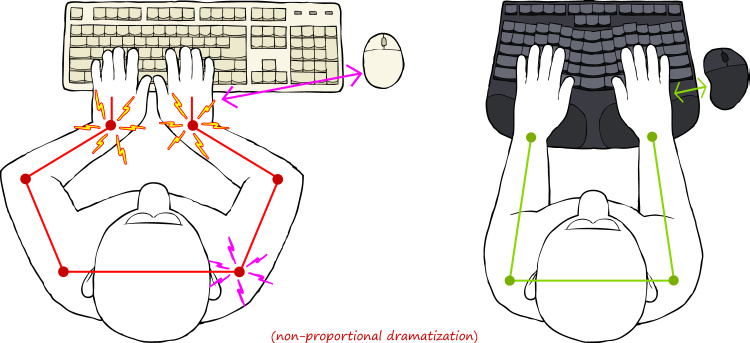
I don't know if it's just me, but I don't use the keyboard like that. I know the illustration is said to be exaggerated, but still. There is no need to squeeze your hands in front of the keyboard. Just naturally bring your hands in front of chest, the same as when you are reading a book or writing notes with a pen. No twisted wrists. No ulnar deviation. The idea that you can't do something with your hand in front of the center of your chest without hurting the wrists seem like a strange supposition.
Admittedly, I've never looked at a significant number of people typing on a non-split keyboard, so I don't have the data to refute the need of this invention. I just feel like the natural posture already doesn't have the problem of ulnar deviation.
smeej|10 days ago
This is madness to me. That would wreak havoc on a wrist. Type Z with the ring finger, X with the middle finger, and C and V with the index finger, just like you type M with your right index finger.
I cannot for the life of me understand the claims by ortholinear fans that fingers travel in a straight line as they expand. Mine don't. My fingers are much farther apart when I extend them than when I pull them in, and I think I have a fairly ordinary set of hands.
marcianx|10 days ago
unknown|10 days ago
[deleted]
qmmmur|9 days ago
wodenokoto|10 days ago
Homerow centric posture is imho the main cause of keyboard related pain.
jbstack|10 days ago
I type at 130 - 135 wpm with my fingers on the home row. I don't have a posture anything like that drawing. In fact I have to make a conscious and uncomfortable effort to contort my hands into that position. It's far more natural (for me) to curve my fingers to hit the right keys rather than curving my wrists so that my hands are perpendicular to the keyboard. Like this:
https://p2.piqsels.com/preview/893/842/416/laptop-business-m...
Stratoscope|10 days ago
It's even easier than the bent wrist position. Take a look at your hands. What is the shortest finger? Your pinky.
The straight wrist position lets you put your pinkies on the home row without the unnatural stretching that the bent wrist requires.
Try it: Keep your wrists straight and start by placing your index fingers and pinkies on the home row. Then let your middle and ring fingers settle into place.
You may notice that your middle and ring fingers arch higher than the index fingers and pinkies. That's fine!
Then start typing. If you're used to the bent wrists, the keys above and below the home row may not be where your muscle memory is used to. Keep at for a while and your fingers will re-learn where the keys are. Just don't let yourself slip back into the bent wrist position, and you will be back up to speed in no time.
Here's a comment from years ago with some crude ASCII art illustrating the difference:
https://news.ycombinator.com/item?id=20663540
ihagen|10 days ago
tomjakubowski|10 days ago
fastasucan|9 days ago
It doesn't have to. It will depend on the distance to the keyboard, the height difference between you and the keyboard, where on your desk the keyboard is placed. It also depends on the person writing ofc.
alexpotato|10 days ago
For example:
- I have long arms (6'3" fingertip to fingertip)
- I have bad vision (20/40 is best I can get even with glasses)
- B/c of the above I like to have the monitor close to me (or I sit closer to the monitor)
- For a long time (5 years) I worked on a trading floor with a desk with very limited depth so my wrists were often turned inward
So I ended up getting a split keyboard (Kinesis Freestyle) so I could spread my hands farther apart so I didn't get the ulnar deviation.
bunderbunder|10 days ago
Anyway, I’ve always hated that diagram because it’s so obviously hyperbolic. I also use standard keyboards on a daily basis, and while there are some posture differences, the bending to make hands perpendicular to the keyboard just does not happen. Comfortably placing your fingers on the home row requires angling your hands a bit because the fingers are all different lengths. Are there some posture differences? Sure. But from what I’ve seen they’re really quite minor.
What I would guess makes more of a difference is tenting. Which is admittedly only possible with a split design. But also, not all split keyboards do tent.
Also, and this one might be specific to my particular problem, moving keys the thumb strikes to a position that it can reach with less stretching has helped a lot. (I suspect that the space bar in particular might have been the source of most of my woes.) And that’s another variable that’s highly correlated with - but still not the same as - the keyboard being split.
SV_BubbleTime|10 days ago
gudzpoz|10 days ago
[1] https://www.keybr.com/
[2] https://colemakmods.github.io/ergonomic-mods/angle.html
urikaduri|10 days ago
RupertSalt|10 days ago
The "numeric keypad" hazard also illustrates why I was motivated to switch my Sun mouse to the left-hand side, and I reversed the buttons in my X11 mappings. This was a reliable way to perplex my coworkers.
vemv|10 days ago
Our bodies love movement and it's often a recipe for solving all sorts of issues.
urxvtcd|10 days ago
SebastianKra|10 days ago
nvarsj|9 days ago
For me the best position is to move my non split keyboard fairly deep into the desk and keep my arms relatively straight. In my 40s and no issue with this after decades.